Got a tax question? We’ll answer for free by email.
Bitte gib eine gültige E-Mail-Adresse ein
Tax season is here. And as a self-employed person or freelancer in Belgium, you might ask yourself: do I have enough set aside to pay my taxes? Or what if the bill is higher than expected?
I get it. Your income can fluctuate, and taxes aren't always top of mind when you're focused on running your business. But the good news is that a little preparation goes a long way. Today I'd like to share 3 tips (and free tools) that can help you prepare for taxes.
How much should you set aside for taxes?
Every time a client pays you, that money isn't all yours. Part of it goes to VAT, part to social contributions, and part to income tax. And then there are expenses: electricity, materials, software, and anything else you spend to run your business.
How much you need to set aside for taxes depends heavily on your personal revenue and expenses. A freelance consultant with almost no overhead has a very different situation from a self-employed tradesperson buying materials every week.
The most reliable way to know how much to set aside is to keep your revenue and expenses up to date in Accountable. Based on your actual income and expenses, Accountable gives you a real-time estimate of what's yours and what's already earmarked for taxes.
3 Tips to never be caught off guard by a tax bill
1. Check your cash available
Your bank balance can be misleading. Just because money is sitting in your account doesn't mean it's yours to spend freely, some of it is already spoken for by upcoming tax obligations.
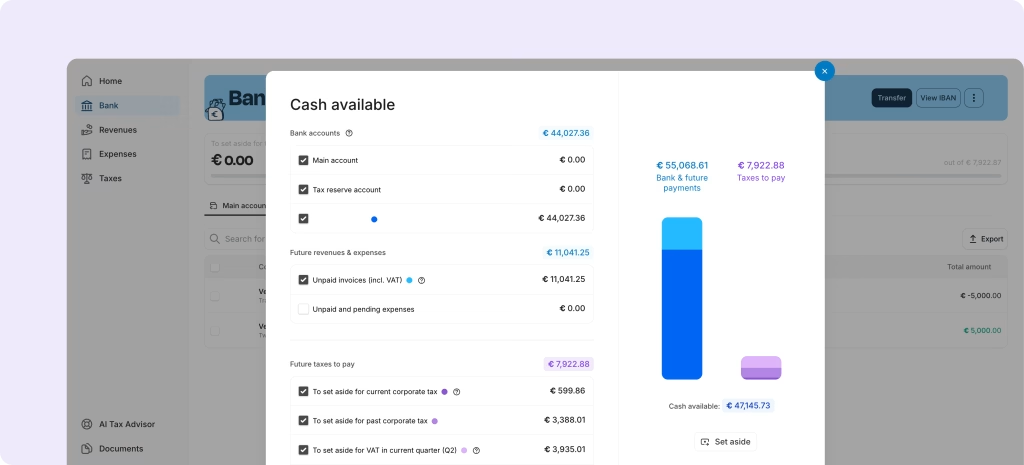
That's why Accountable shows you your cash available, not just your balance. This figure takes into account everything that affects your real financial position:
Your bank balance: the total amount of money that's in your bank account(s).
Future revenue and expenses: invoices you've sent but haven't been paid yet. Accountable knows money is on its way, even if it hasn't landed yet.
Future taxes to pay: Accountable calculates how much income tax, VAT and social contributions you owe.
Unpaid and pending expenses: expenses you've logged in the app or received through Peppol, but haven't been paid yet
The result is a single, honest number: the cash that's genuinely available for you to spend today.
Checking your cash available before you spend is a simple habit, but one of the most effective ways to stay in control of your finances as a self-employed person.
How does Accountable know your future taxes? Based on your current revenue and expenses in the app, Accountable projects what you’ll owe in income tax, VAT and social contributions by the end of the year.
How to see your cash available:
Log in to Accountable
Head to the Bank screen
On mobile: tap the euro sign in the top right corner
On web: click on 'Cash available' in the blue banner
2. Use a dedicated tax reserve account
Knowing how much to set aside is one thing. Actually keeping it separate is another.
Mixing your tax money with your day-to-day income is one of the most common mistakes self-employed people make. When the money is all in one place, it's easy to spend it without realising you'll need it later.
With Accountable Banking, you can move money to a tax reserve account, or create a space for other upcoming costs. This way your VAT, income tax and/or social contributions are untouchable for day-to-day spending and already there when the tax bill comes.
The psychological effect is real: when you can see exactly what's reserved for taxes, you stop second-guessing yourself every time you want to make a purchase. The tax money is there, and the rest is yours.
3. Start saving for taxes automatically
Checking your cash available and using a tax reserve account are great habits. But habits require effort, and effort has a way of slipping when you're busy running a business.
The most effective way to save for taxes is to make it something you never have to think about. With automatic tax savings, Accountable sets aside the right amount at any time.
Here's how to set it up:
Choose your tax categories: VAT, income tax, social contributions, or all three.
Set your coverage percentage: 90% for flexibility, 100% for full coverage, or 110% to stay comfortably ahead.
Accountable handles the rest: the right amount moves to your tax reserve automatically.
No calculations, no manual transfers, no end-of-year surprises. Just the quiet confidence of knowing that every time money comes in, your taxes are already taken care of.
All your taxes, done right
Tax season doesn't have to be stressful. Download Accountable, create a free account, and have everything in place before the next bill arrives.
Common questions about saving for taxes (FAQ)
How much should I set aside for taxes as a self-employed person in Belgium?
It depends on your revenue and expenses, but as a general rule, setting aside 35 to 40% of your net income covers most self-employed people for income tax and social contributions. If you're also collecting VAT, that money should be kept separate from day one. For a precise estimate, track your income and expenses in Accountable and you'll always know exactly how much to set aside.
Does automatic tax savings work for VAT, income tax and social contributions?
Yes. When setting up automatic tax savings, you choose which categories to save for. You can select VAT, income tax, social contributions, or all three.
Is my money stuck in the tax reserve account?
Not at all. You can move money back to your main account at any time. You can also adjust your savings percentage whenever you want, whether your income changes, you take on new clients, or you simply want more or less of a buffer. You stay in full control at all times.
Can I change my savings percentage at any time?
Yes. You can adjust your percentage whenever your situation changes, whether your income increases, you take on new clients, or you simply want more or less of a buffer.
Is Accountable Banking a real bank account?
Yes. Accountable Banking is a fully licensed bank account designed specifically for self-employed people. It comes with an IBAN, a Mastercard debit card, and features like tax pockets and automatic tax savings built in. Opening an Accountable Banking account is also 100% free.
What is the difference between a tax reserve account and a space?
Both are separate pockets within your Accountable Banking account, ringfenced from your day-to-day spending. A tax reserve account is specifically designed for taxes: income tax, VAT and social contributions. A space is more flexible: you can use it to save up for anything you want, whether that's an investment, a holiday, new equipment, or a property. Same concept, different purpose.
What happens if I earn more or less than expected?
Accountable recalculates your tax projection continuously based on your actual income and expenses. If your earnings change, your cash available and tax estimates update automatically.
Author - Alexis Eggermont
Alexis is co-founder at Accountable. He is passionate about leveraging data, AI, technology, and entrepreneurship.
They always answer right away to any question I have, they provide clear answers, and they are very patient even when I struggle to understand. They try to explain in different ways. They are very helpful, responsive and friendly.
Chiara Marradi
01/05/2026
Everything was great! All my questions were answered quickly and in a friendly manner.
Wenzeslawa Wegener
04/05/2026
In the world where everyone seems to be out to get small entrepreneurs and overwhelm them with new rules, more taxes and reporting obligations, Accountable often feels like the one steady partner that actually wants you to succeed, providing quick, clear and personalised support. Thank you!
Janina Arsenjeva
10/04/2026
This is an amazing application with great support on issues. In short as in day I am addicted to it (in a positive way). I myself is from IT project management and the way they have captured the user requirement, it’s phenomenal.
Sumit Tewary
01/12/2024
UI is great. Feature packed and very easy to use. The team at Accountable were VERY quick to respond and their team of technicians soon had a fix in place. Very happy with the level of service so far. Thumbs up from me!
Dean Osborne
14/06/2023
This program is a lifesaver, and it is always improving. Plus, it has an AI chat feature that is actually useful.
Jeffrey Humble
14/01/2026
The coaching session on tax management was excellent, good material, excellent explanations and very insightful. Combined with the AI I never feel alone with Accountable.
Sergio Barbarino
23/04/2026
The availability of your team to help and guide people to understand their finances better is what really makes Accountable valuable. While the AI is able to give answers to most basic questions, specific scenarios need counsel from a human which your team performs beautifully.
Sofiya Bogdan Neves
18/04/2026
Fast and careful answers from Alina. Top service. Thank you.
Anonymous
15/04/2023
They always answer for questions wherever is via direct e-mail or through app. If they can’t answer fully they will forward you to the right place. Documents were always prepared well and ready to send further to government. Everything is intuitive in the app and easy to sort out even for someone completely green in this field.







 01/05/2026