Got a tax question? We’ll answer for free by email.
Bitte gib eine gültige E-Mail-Adresse ein
When you’re self-employed in Belgium, you pay social security contributions every quarter. But what happens if you pay too much and then get a refund of the extra contributions you paid?
That’s good news for your bank account, but how do you correctly report this refund of (part of) your social security contributions and pay the right taxes on it? Find out in this article.
What happens when you get a refund of social security contributions?
As a self-employed person, you pay provisional social security contributions every quarter. After around two years, FPS Finance communicates your actual income to your social security fund. If the estimated income used to calculate your provisional contributions was higher than your actual income, you’ll get back the extra amount you paid.
Your social security fund notifies you and automatically transfers the money to your account, unless you still have an outstanding debt. In this case, the money is used to settle the debt. Note that this only applies to late payments. You still need to pay your contribution for the current quarter.
Your actual income never exactly matches the estimated income on which your social security contributions are calculated, and that’s normal. This is why, after 2 or 3 years, you’re always in one of two situations: either you get some money back, or you have to pay extra. It’s roughly the same principle as when you file your tax return.
An example
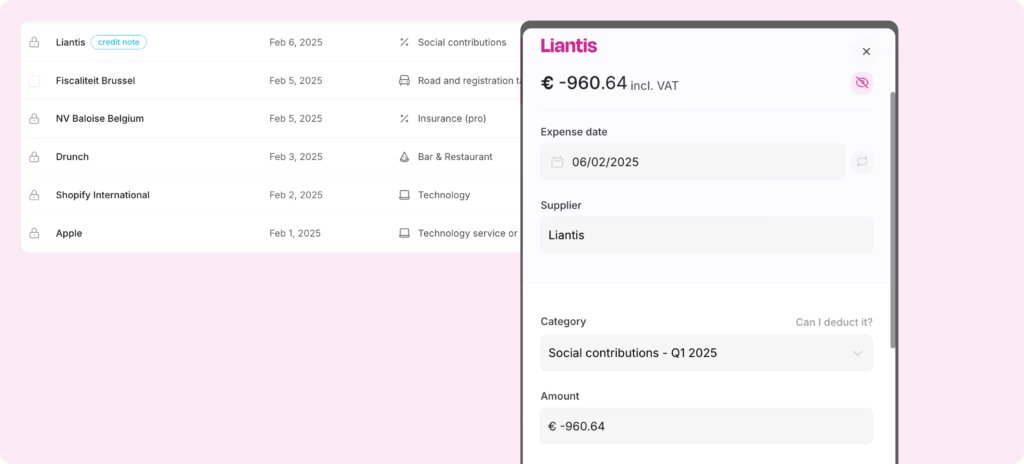
You paid provisional contributions in 2023. In the end, your actual income for that year turned out to be lower. Your social security contributions are recalculated, and you’ll get €960.64 back from your social security fund in 2025.
Not bad, right? But how do you reflect these refunded social security contributions in your accounting?
Refunded social security contributions: how to declare them in your tax return
Getting a reimbursement of your social contributions? Great news! But it needs the right accounting and tax treatment. In your bookkeeping, you record the reimbursement as a negative expense.
On your tax return, box XVII – 1632 should, in principle, show the net amount: the contributions you paid that year, minus the reimbursement. If the reimbursement is smaller than what you paid, that figure stays positive and nothing else changes.
If the reimbursement is larger than what you paid that year, the total becomes negative. Tax on Web doesn't accept a negative amount in box XVII – 1632, so you have two options:
Add the reimbursement to your taxable gross income (box XVII – 1600) and only declare the contributions actually paid in box XVII – 1632. Note: you do this manually, and you also need to remove the reimbursement from your deductible expenses in the Accountable app yourself, otherwise you'd deduct it twice.
Add the negative amount the Accountable app calculates for social contributions to the amount in box XVII – 1600, and enter €0 in box XVII – 1632.
This keeps everything transparent and helps you avoid surprises from the tax authorities. Accountable is happy to make this easy for you. Our app calculates exactly how much you owe in social contributions and reminds you when payment is due.
Indicate the refunded social security contributions in Accountable
Step 1: Add a new expense, just as you would when entering your normal quarterly contributions as a business expense, but this time choose “credit note” (i.e. a negative expense).
Step 2: Indicate the amount you will be reimbursed.
Step 3: The date of the expense needs to correspond to the date of the regularisation received from your social security fund (in this example, 2025), and not to the year the refund relates to (in this example, 2023). For the VAT category, you also need to select the quarter in which the regularisation was received.
Step 4: And that's it! The refund has been entered correctly, and Accountable will automatically include it in your tax return.
In which year’s accounting should the refund be recorded?
Let's say you get a refund in 2025 for social security contributions you overpaid in 2023. This refund needs to be included in your tax return for 2025 income (tax year 2026), even though the original payment was made in an earlier year (2023).
This is one of the rare cases where an accounting operation is carried out in one year and then corrected for tax purposes in a different year.
Accountable likes to make things easier for you. Our app calculates the exact amount of social security contributions you need to pay and reminds you to pay them.
Frequently Asked Questions (FAQ) about social security refunds
What if I have to pay extra?
Sometimes you don't get a refund, but instead have to pay extra social security contributions. If this happens to you, simply record the payment as an additional cost for the year in which you pay it. This cost is tax-deductible, just like your regular social security contributions.
Note that the tax authorities only take into account the contributions you actually paid during the calendar year in question. Did you pay an additional amount in 2025 for 2023? Then deduct it on your tax return for your 2025 income (tax year 2026).
What happens if I get back more money than I paid that year?
You can happen that you receive a refund that’s higher than what you actually paid that year in social security contributions, for example, due to a correction from several previous years. This isn’t something to worry about. Simply enter the amount received as a negative cost, or credit note. The tax authorities will automatically record the correct distribution over the relevant years via your tax return.
When should I adjust my social security contributions?
It’s normal for your actual income not to match your estimated or provisional income exactly. However, if you find that you’re paying considerably too much (or too little) in social security contributions, consider adjusting the amount of your social security contributions.
Author - Valesca Wilms
As content marketing lead at Accountable Belgium, Valesca writes about freelancing, self-employment, and taxes based on her own experience as a freelancer.
They always answer right away to any question I have, they provide clear answers, and they are very patient even when I struggle to understand. They try to explain in different ways. They are very helpful, responsive and friendly.
Chiara Marradi
01/05/2026
Everything was great! All my questions were answered quickly and in a friendly manner.
Wenzeslawa Wegener
04/05/2026
In the world where everyone seems to be out to get small entrepreneurs and overwhelm them with new rules, more taxes and reporting obligations, Accountable often feels like the one steady partner that actually wants you to succeed, providing quick, clear and personalised support. Thank you!
Janina Arsenjeva
10/04/2026
This is an amazing application with great support on issues. In short as in day I am addicted to it (in a positive way). I myself is from IT project management and the way they have captured the user requirement, it’s phenomenal.
Sumit Tewary
01/12/2024
UI is great. Feature packed and very easy to use. The team at Accountable were VERY quick to respond and their team of technicians soon had a fix in place. Very happy with the level of service so far. Thumbs up from me!
Dean Osborne
14/06/2023
This program is a lifesaver, and it is always improving. Plus, it has an AI chat feature that is actually useful.
Jeffrey Humble
14/01/2026
The coaching session on tax management was excellent, good material, excellent explanations and very insightful. Combined with the AI I never feel alone with Accountable.
Sergio Barbarino
23/04/2026
The availability of your team to help and guide people to understand their finances better is what really makes Accountable valuable. While the AI is able to give answers to most basic questions, specific scenarios need counsel from a human which your team performs beautifully.
Sofiya Bogdan Neves
18/04/2026
Fast and careful answers from Alina. Top service. Thank you.
Anonymous
15/04/2023
They always answer for questions wherever is via direct e-mail or through app. If they can’t answer fully they will forward you to the right place. Documents were always prepared well and ready to send further to government. Everything is intuitive in the app and easy to sort out even for someone completely green in this field.







 01/05/2026